
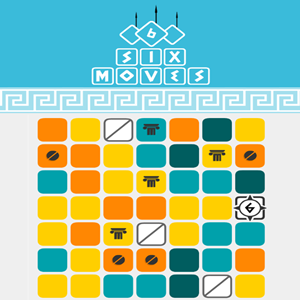
Six Moves
Game Introduction
Six Moves delivers one of the smoothest 3D experiences available. completely free to play online, play directly in your browser, no installation needed.
This is a challenging match 3 game set in a 7 by 7 grid of 49 cells.1.Move your white block around the grid to displace other cells.2.Within 6 moves create matches with 3 or more identically colored tiles in a row horizontally or diagonally.3.Sum the cells to high enough values to defeat all the fighters atop each stage.4.Use special moves to help you when you are stuck, or take the loss and try again.
What makes Six Moves special? rich content with low entry barrier. beginner-friendly, anyone can play, play on PC or mobile, seamless switching. every round brings new challenges and surprises. well-optimized, runs well even on modest devices.
Whether you have a few minutes to spare or want a deep gaming session, Six Moves has something for everyone. The game balances depth and fun, offering enjoyment for all types of players.
How To Play
Getting started with Six Moves is simple. beginner-friendly, anyone can play. Use your mouse for precise control on desktop, or tap and swipe naturally on mobile. play on PC or mobile, seamless switching. Within minutes, the controls will feel second nature.
Quick Start
To start playing
Six Moves , simply click the play button above.
That's all it takes —
play directly in your browser, no installation needed.
The game is
completely free to play online and automatically adjusts to fit your screen perfectly.
responsive and smooth with great performance
Game Controls:
Desktop:1.Press the A key or the left arrow key to move left a square.2.Press the D key or the right arrow key to move right a square.3.Press the W key or the up arrow key to move up a square.4.Press the S key or the down arrow key to move down a square. Touchscreen devices:Tap the screen with a finger and swipe in the direction you wish to move. Controls & indicators:1.Your game score is shown top center.2.Enemies above the grid show how many hit points it takes to defeat them and what color you need to match to defeat them.3.Your box with arrows on it shows a number indicating how many moves you have to make a valid set.4.Each merged block in the grid shows a numerical value on it.5.When you lose a level the defeated screen shows what level number you were on.6.In the lower right there are buttons for your three special power moves.6.1.You get unlimited moves with the shift up option, but you only get 3 credits each for the other 2 power move types.
Game Tips:
Take your time to explore the mechanics and try different strategies.
full of unknowns and fun, fresh every time.
Pay attention to visual and audio feedback — they'll help you improve quickly.
Performance Tips:
Make sure JavaScript is enabled and your browser supports HTML5 Canvas.
stable performance, no lag or delays.
If you encounter any issues, refreshing the page usually resolves them.
FAQ
Is
Six Moves free?
Yes!
completely free to play online,
play directly in your browser, no installation needed.
What devices are supported?
play on PC or mobile, seamless switching.
low system requirements, works on older devices
Do I need to register or download anything?
Not at all.
play directly in your browser, no installation needed, click and play with no hassle.
Is it suitable for beginners?
beginner-friendly, anyone can play.
rich in detail with high replay value
What are the system requirements?
Very low.
excellent performance with smooth visuals. Most devices can run it
smoothly.
Can I save my progress?
Yes. Your progress is automatically saved so you can continue anytime.
completely free to play online, no time limits.
Page not loading properly?
If the page loads slowly or doesn't display correctly, try refreshing the page first. Most loading
issues are
resolved with a simple refresh. If problems persist, feel free to contact us at
[email protected]
and we'll help you as soon as possible.























Comments on " Six Moves" :